



You must Register Your Account with Allyhealth to use Services
Allyhealth App: https://www.allyhealth.net/getapp/
Videos
How To Register Your AllyHealth Account
Adding Dependents to Your AllyHealth Account
The Best way to access your coverage under this program is by Downloading the
Allyhealth App: https://www.allyhealth.net/getapp/
Before you can utilize these services you must register your account, during this process you will also be able to add family members at NO additional cost.
While the App is the preferred method to Register and Access coverage, you do also have the option to access these services online: https://allyhealth.app/#/ or by phone 888-565-3303. When calling in you may need to specify that your program is with Allyhealth.
Your coverage allows for UNLIMITED FREE calls to speak to a physician that can then prescribe medicine if necessary and they will then call that prescription in to the pharmacy of your choice.
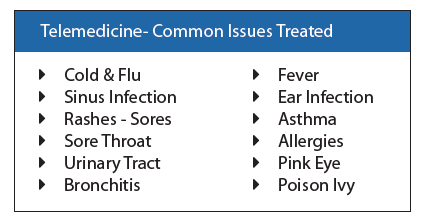
The Best way to access your coverage under this program is by Downloading the
Allyhealth App: https://www.allyhealth.net/getapp/
Before you can utilize these services you must register your account, during this process you will also be able to add family members at NO additional cost.
While the App is the preferred method to Register and Access coverage, you do also have the option to access these services online: https://allyhealth.app/#/ or by phone 888-565-3303. When calling in you may need to specify that your program is with Allyhealth.
Your coverage under the Telemedicine benefit allows for UNLIMITED FREE calls to speak to a physician that can then prescribe medicine if necessary and they will then call that prescription in to the pharmacy of your choice. The Teletherapy/Mental Health benefit provides up to 10 Free visits for your household to speak with a licensed therapist, counselor, or behavioral health specialist for continued long term counseling sessions.
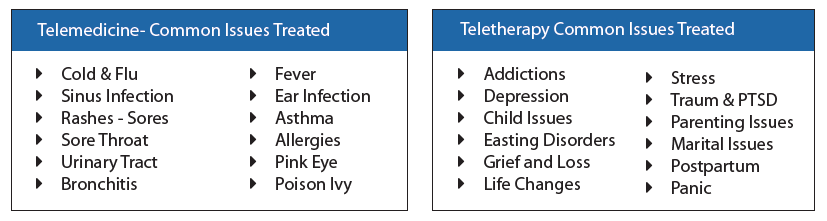
The Best way to access your coverage under this program is by Downloading the
Allyhealth App: https://www.allyhealth.net/getapp/
Before you can utilize these services you must register your account, during this process you will also be able to add family members at NO additional cost.
While the App is the preferred method to Register and Access coverage, you do also have the option to access these services online: https://allyhealth.app/#/ or by phone 888-565-3303. When calling in you may need to specify that your program is with Allyhealth.
Your coverage under the Telemedicine benefit allows for UNLIMITED FREE calls to speak to a physician that can then prescribe medicine if necessary and they will then call that prescription in to the pharmacy of your choice. The Virtual Primary Care benefit provides unlimited access to an ongoing physician dedicated to understanding your needs. Annual Wellness Health Risk Assessment with FREE Lab work once per year, Easy Maintenance Drug Management with just a phone call for refills, Specialist Referrals, typical primary care service from the comfort of your home. Our Dermatology service provides easy access for expedited diagnosis and treatment, significantly lower wait times to access to a dermatologist, Review of provided imagines of potential issues within 72 hours.
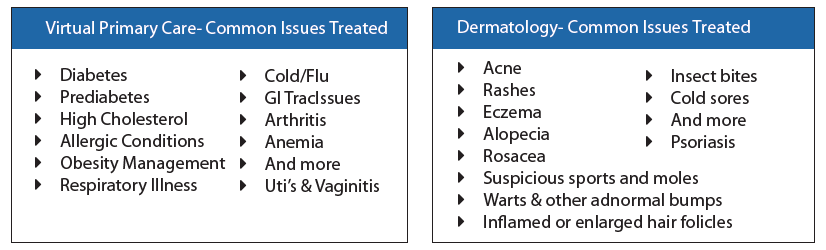
The Best way to access your coverage under this program is by Downloading the
Allyhealth App: https://www.allyhealth.net/getapp/
Before you can utilize these services you must register your account, during this process you will also be able to add family members at NO additional cost.
While the App is the preferred method to Register and Access coverage, you do also have the option to access these services online: https://allyhealth.app/#/ or by phone 888-565-3303. When calling in you may need to specify that your program is with Allyhealth.
Your coverage under the Telemedicine benefit allows for UNLIMITED FREE calls to speak to a physician that can then prescribe medicine if necessary and they will then call that prescription in to the pharmacy of your choice. The Teletherapy/Mental Health benefit provides up to 10 Free visits for your household to speak with a licensed therapist, counselor, or behavioral health specialist for continued long term counseling sessions. The Virtual Primary Care benefit provides unlimited access to an ongoing physician dedicated to understanding your needs. Annual Wellness Health Risk Assessment with FREE Lab work once per year, Easy Maintenance Drug Management with just a phone call for refills, Specialist Referrals, typical primary care service from the comfort of your home. Our Dermatology service provides easy access for expedited diagnosis and treatment, significantly lower wait times to access to a dermatologist, Review of provided imagines of potential issues within 72 hours.
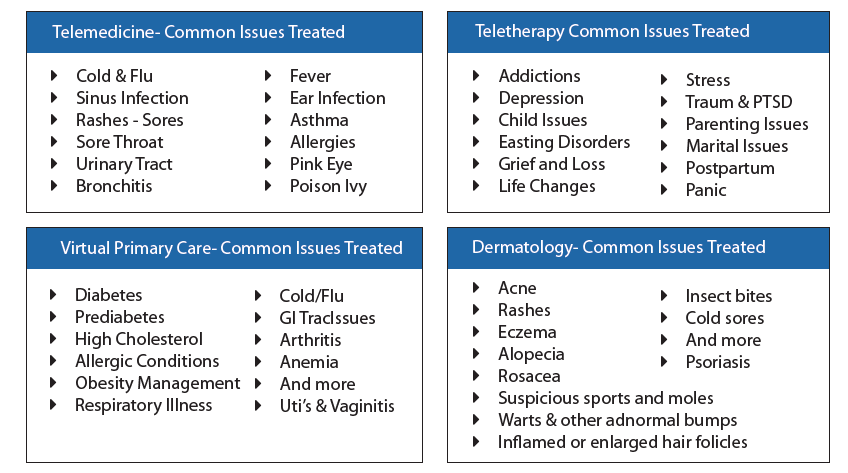
The Best way to access your coverage under this program is by Downloading the
Allyhealth App: https://www.allyhealth.net/getapp/
Before you can utilize these services you must register your account, during this process you will also be able to add family members at NO additional cost.
While the App is the preferred method to Register and Access coverage, you do also have the option to access these services online: https://allyhealth.app/#/. The APP is the preferred method to access, but you can access the EAP via phone, 888-388-0397 or Health and Wellness 888-975-9355.
The EAP is meant to provide you with instant access to in the moment stresses that can provide you with one on one counseling. There is also a Concierge service for Child and Elder Care Resources, Legal and Financial Assistance and Library of Resources available on the app. The program allows up to 3 sessions per issue for the Short Term Counseling. The program also provides Health and Wellness Coaching with the ability to provide you with a customized wellness and action plan to help reach our goals. Eligible for up to 6 sessions per family member, per wellness goal, per year.
-%20w%20Health%20and%20Wellness-1.png)
-%20w%20Health%20and%20Wellness-2.png)
To Get Set up Directly with Metlife you may do so by Registering with MyBenefits with Metlife Online Portal Instructions
When Registering you will need to Select an Employer Group Based on your Plan- Either Optima Payroll Services Corp or CCA Global Partners depending on your plan.
In the event you have Multiple Accounts with Multiple Employer Groups you will need to Link your accounts Linking Multiple MyBenefits Accounts with Metlife Instructions
MyBenefits (for Employees)
Technical Support
Hours: Monday through Friday, 9 a.m. to 8 p.m. Eastern time
Phone: 1-877-963-8932
When to File a Claim: After you or your covered dependents receive services as a result of an accident
How to File a Claim: Easiest option is to register Online at www.mybenefits.metlife.com or on the Metlife Mobile App. In order to register online you will need to locate the Employer or Association which is “Optima Payroll Services Corp.” and will click to Register. You will then need to locate your policy to file a claim which will require you to upload your medical documentation to support your claim. You can also call the Claims Department 866-626-3705 available Monday through Friday 7am – 7pm CST.
Forms you May Need: Emergency Room, Urgent Care, Physician Visit or hospitalization discharge papers; exam, lab or test results/reports; physician notes; Explanation of Benefits (EOBs) from your health insurance provider; itemized medical or hospital bills; or medical records
Once a Claim is Filed: The Claims Department will review all items and contact you with any questions or request additional information if needed. The easiest way to review your claim status is through the www.mybenefits.metlife.com website.
When to File a Claim: After a Physician has diagnosed you or a covered dependent with a covered illness or after you or a covered dependent have undergone a health screening - $50 benefit.
How to File a Claim: Easiest option is to register Online at www.mybenefits.metlife.com or on the Metlife Mobile App. You can also call the Claims Department 866-626-3705 available Monday through Friday 7am – 7pm CST.
Once a Claim is Filed: The easiest way to review your claim status is through the www.mybenefits.metlife.com website.
IN-Network Coverage: The CCA Global Partners plan uses the Metlife PDP Plus Network. If you are able to use an IN Network provider the coverage for the 2 plans is identical. The High Plan provides you with greater coverage when NOT using a network provider. Please use this link to do a Search for IN Network Providers:
https://providers.online.metlife.com/findDentist?searchType=findDentistMetLifeOut of Network Coverage: The High plan provide 90% UCR OUT of NETWORK coverage which means that you will be covered as the plans indicates as long as the dentist you are working with does not charge more than what 90% of dentist in the area charge. So under this plan you are able to use ANY DENTIST regardless of them being in the Metlife network and receive full coverage (100%, 80%, 50%). The LOW plan is a MAC plan, which means that out of network dentists, while still covered, will be paid based off a fee schedule set by the carrier. So if you are on the LOW plan and go out of network you will have overage fees to pay.
Registering with Metlife: When registering online with Metlife you will choose the Employer: CCA Global Partners.- Online will provide you access to ID cards, Account and Claim Information. Metlife does not provide ID cards in the mail but can get them online or below. Metlife uses the subscriber’s social as the ID number.
CCA Global Dental High and Low
IN-Network Coverage: The Optima Trust Dental plan uses the Metlife PDP Plus Network. Coverage for services are best priced when using an IN Network provider. Please use this link to do a Search for IN Network Providers:
https://providers.online.metlife.com/findDentist?searchType=findDentistMetLifeOut of Network Coverage: The Ultra, High, and Medium plans provide 90% UCR OUT of NETWORK coverage which means that you will be covered as the plans indicates as long as the dentist you are working with does not charge more than what 90% of dentist in the area charge. So under these plans you are able to use ANY DENTIST regardless of them being in the Metlife network and receive full coverage(100%, 80%, 50%). The LOW plan is a MAC plan, which means that out of network dentists, while still covered, will be paid based off a fee schedule set by the carrier. So if you are on the LOW plan and go out of network you will have overage fees to pay.
Registering with Metlife: When registering online with Metlife you will choose the Employer: Optima Payroll Services Corp.- Online will provide you access to ID cards, Account and Claim Information. Metlife does not provide ID cards in the mail but can get them online or below. Metlife uses the subscriber’s social as the ID number.
Optima Low, Medium, High, Ultra Dental
When to File a Claim: After you or a covered dependent have had a hospital stay or receive services performed as the result of a covered illness or injury
How to File a Claim: Easiest option is to register Online at www.mybenefits.metlife.com or on the Metlife Mobile App. You can also call the Claims Department 866-626-3705 available Monday through Friday 7am – 7pm CST.
How to Setup Your Account: Start at https://my.aura.com/start Click “Get Started”. You will then add your necessary information to begin your access with Aura. Active and utilize additional features, view alerts & set your contact preferences, add members to a family plan.
You may want to download the Aura App for easy convenient access to your features:
Google Play: https://play.google.com/store/apps/details?id=com.aura.suite
Apple: https://apps.apple.com/us/app/aura-security-protection/id1547735089
Have Questions: Contact Aura’s Customer Service available 24/7: 844-931-2872
How to Setup Your Account: Start at https://members.legalplans.com. You will create your account with your Email and Setting a Password. You will need to provide your typical information when registering. IMPORTANT: The Employer Group is Optima Payroll Services Corp.
Eligibility ID: When creating an account you will then be assigned an Eligibility ID: This is the ID that will be used to provide proof of enrollment when accessing services. It is a 9 digit alphanumeric identifier that can be found at the top right (dropdown menu under My Account).
Using your Plan: Once we confirm your eligibility, you will have access to a guided process to see your coverages and be connected to an attorney to help you with your legal issue.
Adding Dependents: Under account settings, go to “Manage Dependents”, click on invite dependents, add their email and confirm their relationship.
For Help Setting up Your Account: Call 800-821-6400
How to Find an Attorney: Visit members.legalplans.com- Search by Zip Code, Experience, Specialty, or other filters. Or Call 800-821-6400.
Make An Appointment: Call the attorney directly after searching the website to set up a phone or in person meeting. Call Client Service Center to schedule the appointment for you. 800-821-6400
NO LIMITS on the number of times you can use this benefit.
- Member Portal
- Get in Touch [For Voluntary, please call 1-800-929-1492] [For Employer Paid, please call 1-800-300-4296]
- File a Claim
- More Information About your Benefits
Coverage for the MetLife Pet Insurance through Optima Payroll Services Corp. is set up directly with MetLife. All payments are handled directly with MetLife when you enroll.
Sign up for coverage
Customer support and account access
- Download the mobile app (Apple)
- Download the mobile app (Google)
- Call Customer Support: 866-937-7387
Mobile app features
- Access policy information
- Submit and track claims
- Upload and view pet health records
- 24/7 telehealth concierge access
- Locate nearby pet services
Submitting a claim
80% of claims are processed within 5 days.
- Submit through the mobile app
- Submit online
- Email: pet_submit_claim@metlife.com (include policy number)
Required documentation
- Veterinary SOAP notes
- Itemized invoice
- 12 months of medical history for first claims
Claim process overview
- You’ll receive confirmation when documents are received
- Status updates appear in app or online
- Additional info requests pause processing
- Claims may be reopened when info is provided
- Final outcome includes an explanation of benefits
- Member Portal
- Get in Touch [For Voluntary, please call 1-800-929-1492] [For Employer Paid, please call 1-800-300-4296]
- File a Claim
- More Information About your Benefits
IN-Network Coverage: The CCA Global Partners Vision plan uses the VSP Network. Search for IN Network Providers: https://mymetlifevision.com/find-provider-location-internal.html. For online orders VSP Vision is IN Network with Eyeconic, www.eyeconic.com
Registering with Metlife: Choose the Employer: CCA Global Partners. Online provides access to ID cards, Account and Claim Information.
IN-Network Coverage: The Optima Trust Vision plan uses the Davis Vision Network. Search: https://idoc.metlife.com/members/MetLife/FindAProvider/Index. For online orders Davis Vision is IN Network with 1800 Contacts, Warby Parker, Glasses.com, Visionworks, Befitting.
Registering with Metlife: Choose the Employer: Optima Payroll Services Corp.
IN-Network Coverage: VSP Vision Network. Search: https://mymetlifevision.com/find-provider-location-internal.html. For online orders VSP Vision is IN Network with Eyeconic, www.eyeconic.com
Registering with Metlife- Choose Employer: Optima Payroll Services Corp.
When to File a Claim: After you or your covered dependents receive services as a result of an accident
How to File a Claim: Call the Claims Department 866-547-4205 available Monday through Friday 8am – 6pm EST.
Or online at TheHartford.com/benefits/myclaim – register and click “Complete Your Claim Form Online”
Once a Claim is Filed: For status call 866-547-4205 or go online TheHartford.com/benefits/myclaim
When to File a Claim: After a Physician has diagnosed you or a covered dependent with a covered illness or after you or a covered dependent have undergone a health screening - $50 benefit.
How to File a Claim: Call 866-547-4205 (Mon–Fri 8am–6pm EST) or online TheHartford.com/benefits/myclaim
When to File a Claim: After you or a covered dependent have had a hospital stay or receive services performed as the result of a covered illness or injury
How to File a Claim: Call 866-547-4205 (Mon–Fri 8am–6pm EST) or online TheHartford.com/benefits/myclaim
When to File a Claim: Your policy has a 180 Waiting Period, if you have been absent from work please call to be advised when to file a claim.
How to File a Claim: Call 888-301-5615 8am-8pm EST
When to File a Claim: Your policy has either a 7 or 14 day Waiting Period, if you have been absent from work please call to be advised when to file a claim.
How to File a Claim: Call 888-301-5615 8am-8pm EST
When to File a Claim: When a covered person has passed away.
How to File a Claim: Call Optima 585-506-4000 or email info@optimabenefitsgroup.com
Whole Life
Your Mass Mutual Whole Life Insurance Policy has the following features:
- Permanent Insurance
- Builds Cash Value
- Guaranteed NO Price Increases
- Guaranteed NO Reduction in Benefit
- Can pay a Dividend
- Accelerated Benefit if Terminally Ill
Mass Mutual Account Set up – https://massmutual.ins-portal.com – For Questions about the portal you can call 844-975-7522 option 1.
How to File a Claim: In the event of a Death Claim you must first notify Mass Mutual at MassMutualservice@illumifin.com. Mass Mutual will then reach out to provide you with the necessary information in order to file your claim.
How do I register my pets?
To complete your pet registration, visit the PetPartners Pet Portal and complete the steps below:
- Enter the email address associated with your pet insurance enrollment.
- You will receive a temporary password via email and must create a new password.
- Upon first log-in, you will be prompted to complete your pet registration and customize your policy by entering your pet details by clicking Complete Your Pet Registration Now!
How do I file a claim?
- From the Home Screen, click File a Claim.
- Enter the requested information.
- Upload your itemized invoice.
- Choose how you would like to be reimbursed.
To set up your account with Sedera, you will need the email you use to enroll on the Optima Portal:
For Existing Members: memberservices@sedera.com or (855) 973-3372
Sedera Members are cash-pay patients, which means you pay your health care and medical care providers directly. This allows you to maintain a direct relationship with your caring professionals, free of third parties.
Sedera’s Member Advisors and Needs Coordinators are available and happy to assist Members in locating high-quality medical providers, answer questions or help with claims. If you have questions, please call a Sedera Member Advisor at 855-973-3372 or email memberservice@sedera.com
How to File for a Need
For medical bills to be considered for sharing amongst the Community, you must submit itemized invoices. Be sure to ask your provider for an itemized statement when receiving medical care. Medical bills can be submitted to a Needs Case through your Member Portal within 6 months of the Date of Service. Once all required information has been received, bills are typically shared within 14–21 days, unless negotiation is required.
Acceptable itemized invoices must include
- Provider information (name, address, phone)
- Patient Name
- Date of Service(s)
- Itemized description of medical services rendered
- Original amount charged
- Discounts, if any
- Proof of patient payments, if any

INTRODUCING GLICRX
Optima is proud to announce we have exclusive access to GlicRx!
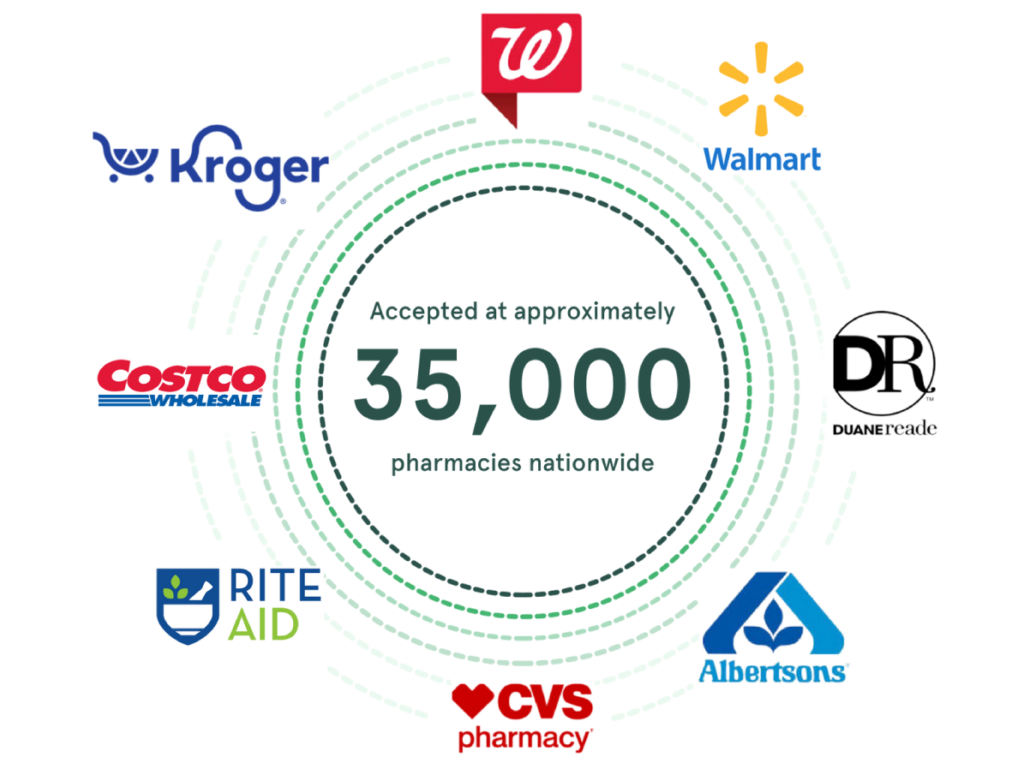
GlicRx provides a free discount card that saves people up to $95* off eligible brand and generic medications at pharmacies including CVS, Walgreens, Rite Aid, and many more. It provides a huge relief for people who don’t have prescription coverage, are underinsured or who have high co-pays.
As one of our valued users/members/customers, you have exclusive access to these discounts through the GlicRx website and mobile app. Visit the GlicRx website or mobile app via the links below to sign up and search for discounts near you!
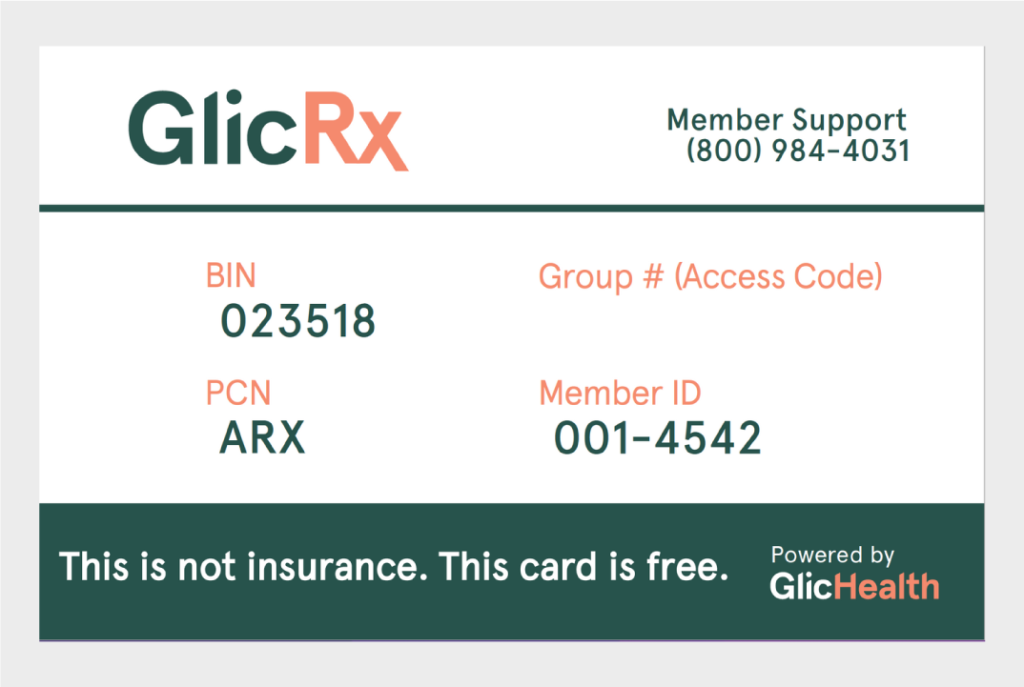
Download your GlicRx discount card here.
BGRX101 (website): https://applink.glicrx.com/CSFR50wzSzb
BGRX102 (app): https://applink.glicrx.com/MKTw1fBzSzb
The GlicRx Prescription Savings Program is not insurance.
How It Works

Step 1: Take a card today

Step 2: Show pharmacist your card at purchase

Step 3: Use discount card to save up to $95*
Discount Figures
When the GlicRx discount rate applies, users experience:
- 50% average discount per prescription
- $35 average savings per prescription
Get Started
Visit GlicRx.com or download the app to your smartphone.



To learn more about the GlicRx Prescription Savings Program, including eligible pharmacies, included prescriptions and related pricing, and other important terms and conditions and contact information, contact Optima today!
*Prescription savings vary by prescription and pharmacy, and may reach up to $95 off retail price.